User guide
Book and cancel
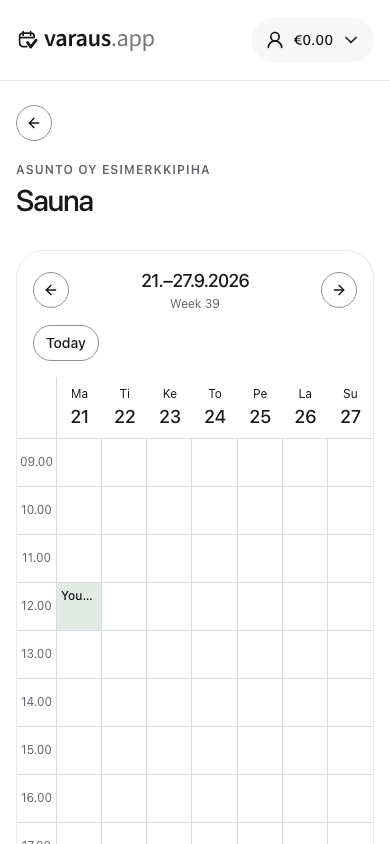
- Open Bookings and select a resource.
- Select an available time in the calendar. On a computer, drag to select a longer period.
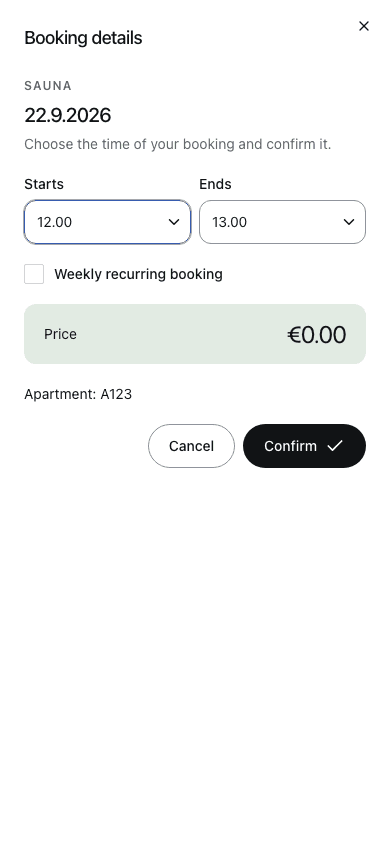
- Check the time and price. If the resource allows weekly bookings, you can select Weekly recurring booking.
- Select Confirm. The booking appears in the calendar and in your own bookings.
Cancel a booking
Open your booking and select Cancel booking. The resource's cancellation deadline determines how late you can cancel. Refunds for paid bookings return to your service balance.
Recurring bookings repeat weekly. Check whether you are cancelling one occurrence or the entire recurring booking. Paid recurring bookings require sufficient balance.
Use the calendar labels to distinguish your own bookings, other bookings and administrator bookings. Do not rely on colour alone.